
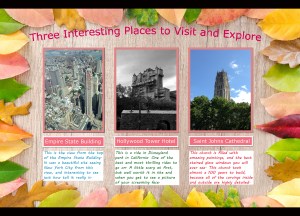
I decided to create a brochure of “Three Amazing Places to Visit and Explore” that I have personally been to. This project idea relates to my topic because instead of showing my followers places that I want to go to, or are interesting, I have shown three places that I have actually been to, and why they are so great. I was mainly inspired by a brochure that I saw in a airport that had amazing pictures on it of places to travel, and little descriptions of each one. I looked up some designs, and other brochures to see how they labeled and created their projects, and I took small bits and pieces from each. The significance behind my design is that these are all places that I love because I visited them with my family. It brings back old memory’s for me, and makes me appreciate where I came from. My design process was not all that complex. I started off realizing I wanted a nice, appropriate, background so I went to a free online background site where I picked one out. Next I added my three photos onto the background. I cropped the images to a desired size, added a stroke and a drop shadow to each. Then I edited each photo individually and either added brightness, contrast, etc. I put labels under each photo so you could tell which was which. Then a small description or my thoughts on each place. Finally I added the main title to the whole design, and curved the writing to give it a better look. Saved the whole thing, and posted it. I collected these photos by taking them with my own phone when I went to visit each place. My process was to keep in nice and simple, so it is easy to read and clear of the meaning behind it. I mainly used contrast and lighting editing, but also a lot of photo filters and format editing. My main challenge was editing my pictures then inserting them back into the design in the same form. I solved this by going back into the tutorial and realizing what I did wrong, and fixed it on site. The only tip I have is to not skip past the directions Photoshop gives you, read them and it will help you greatly.
After getting back some of the reviews about my project, I made some excellent changes. First off I added a white back drop to my descriptions, by using the rounded rectangle tool . Next I altered my photos more with different effects I learned, and made them more appealing to the eye. I then made my heading altered into the background, that was from learning about the crumpled paper tutorial. I lined up my labels and text better with one another, to make it look more professional. Finally I changed one of the descriptions, because it was not very vivid, and it wasn’t really a specific place. To me, it looks much better now, and I couldn’t be happier about it!
Background Credit:
https://www.pexels.com/photo/assorted-leaves-piled-on-border-of-brown-wooden-board-630754/
Free for personal and commercial use
No attribution required


Leave a Reply