Draft Logo Project

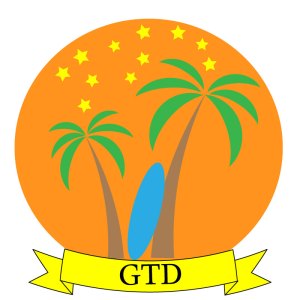
For this project I have decided to create a very simple design, giving off the implication of traveling. This relates to my course topic because the palm trees and the surf board are giving off the indication that you’re on vacation. I was mainly inspired by some palm trees I saw in an ad online for great vacations. I did not do a whole lot of research trying to come up with my design, most of it pretty much just came to me. The significance is how subtle it is, and how relaxed it makes you feel, which you should when you’re on vacation.

My design process was a little complex, but the tutorials really helped me out. I started off by using the polygon tool and turning that into a triangle. I shrunk it into the desired size to make the base of the tree. I then warped it in the effects category so it wasn’t just up and down. I managed to do this exact process to make the leaves. I copied and rotated thee entire design to make the other tree. The surf board was created through the ellipse tool and I simply just stretched it out. The banner I made from the same tutorial from the logo tutorials. And the back ground I enlarged a circle, and pushed it to the back, and finally adding the stars to the upper area.

I managed to create this project using the tutorials we watched earlier this week, and I spent a lot of time fidgeting with illustrator, coming up with new ways to create things. My process for constructing my project was to try and keep it simple, yet elegant. The main tools I used were the polygon tool, and the warp effect to give my pieces a better look and feel. The main challenge i had was coming up with a way to first construct the leaves. It took me a very long time to get the right shape, and I was unsure on how to even get that shape to begin with. I solved this by trial and error, going back and forth trying to get the perfect shape.

Obviously this is not my final project and I would never intend it to be. I have many more corrections that I already see, and desire to fix. But this is a good base start for my final logo design.

 

Logo Sketch

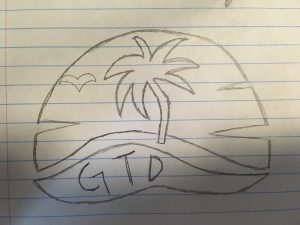
My idea for this project is to make a sunset in the background, a wave at the bottom, and a big palm tree right in the middle. I also inserted the initials “GTD” which stands for Greatest Travel Destinations.

Final Graphic Design Project

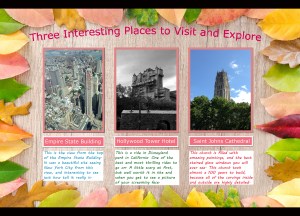
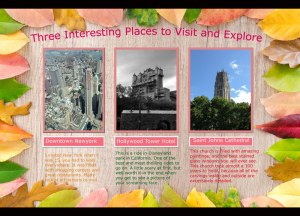
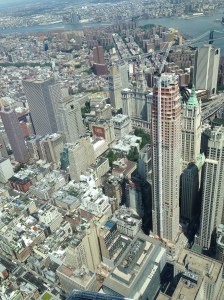
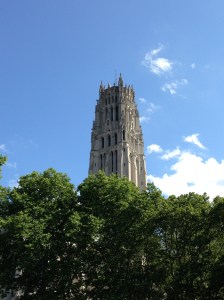
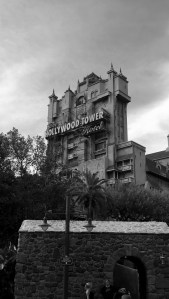
I decided to create a brochure of “Three Amazing Places to Visit and Explore” that I have personally been to. This project idea relates to my topic because instead of showing my followers places that I want to go to, or are interesting, I have shown three places that I have actually been to, and why they are so great. I was mainly inspired by a brochure that I saw in a airport that had amazing pictures on it of places to travel, and little descriptions of each one. I looked up some designs, and other brochures to see how they labeled and created their projects, and I took small bits and pieces from each.  The significance behind my design is that these are all places that I love because I visited them with my family. It brings back old memory’s for me, and makes me appreciate where I came from. My design process was not all that complex. I started off realizing I wanted a nice, appropriate, background so I went to a free online background site where I picked one out. Next I added my three photos onto the background. I cropped the images to a desired size, added a stroke and a drop shadow to each. Then I edited each photo individually and either added brightness, contrast, etc. I put labels under each photo so you could tell which was which. Then a small description or my thoughts on each place. Finally I added the main title to the whole design, and curved the writing to give it a better look. Saved the whole thing, and posted it. I collected these photos by taking them with my own phone when I went to visit each place. My process was to keep in nice and simple, so it is easy to read and clear of the meaning behind it. I mainly used contrast and lighting editing, but also a lot of photo filters and format editing. My main challenge was editing my pictures then inserting them back into the design in the same form. I solved this by going back into the tutorial and realizing what I did wrong, and fixed it on site. The only tip I have is to not skip past the directions Photoshop gives you, read them and it will help you greatly.

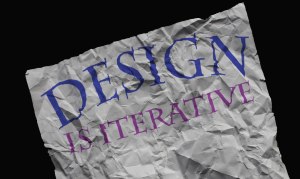
After getting back some of the reviews about my project, I made some excellent changes. First off I added a white back drop to my descriptions, by using the rounded rectangle tool . Next I altered my photos more with different effects I learned, and made them more appealing to the eye. I then made my heading altered into the background, that was from learning about the crumpled paper tutorial. I lined up my labels and text better with one another, to make it look more professional. Finally  I changed one of the descriptions, because it was not very vivid, and it wasn’t really a specific place. To me, it looks much better now, and I couldn’t be happier about it!


Background Credit:

https://www.pexels.com/photo/assorted-leaves-piled-on-border-of-brown-wooden-board-630754/

Free for personal and commercial use

No attribution required

Draft Graphic Design Project

I decided to create a brochure of “Three Amazing Places to Visit and Explore” that I have personally been to. This project idea relates to my topic because instead of showing my followers places that I want to go to, or are interesting, I have shown three places that I have actually been to, and why they are so great. I was mainly inspired by a brochure that I saw in a airport that had amazing pictures on it of places to travel, and little descriptions of each one. I looked up some designs, and other brochures to see how they labeled and created their projects, and I took small bits and pieces from each.  The significance behind my design is that these are all places that I love because I visited them with my family. It brings back old memory’s for me, and makes me appreciate where I came from. My design process was not all that complex. I started off realizing I wanted a nice, appropriate, background so I went to a free online background site where I picked one out. Next I added my three photos onto the background. I cropped the images to a desired size, added a stroke and a drop shadow to each. Then I edited each photo individually and either added brightness, contrast, etc. I put labels under each photo so you could tell which was which. Then a small description or my thoughts on each place. Finally I added the main title to the whole design, and curved the writing to give it a better look. Saved the whole thing, and posted it. I collected these photos by taking them with my own phone when I went to visit each place. My process was to keep in nice and simple, so it is easy to read and clear of the meaning behind it. I mainly used contrast and lighting editing, but also a lot of photo filters and format editing. My main challenge was editing my pictures then inserting them back into the design in the same form. I solved this by going back into the tutorial and realizing what I did wrong, and fixed it on site. The only tip I have is to not skip past the directions Photoshop gives you, read them and it will help you greatly.


Background Credit:

https://www.pexels.com/photo/assorted-leaves-piled-on-border-of-brown-wooden-board-630754/

Free for personal and commercial use

No attribution required

About my blog, and its future…

All my life I have wanted to travel and experience the world. But, at the moment I am in school, and need money to be able to travel. I mainly want to show places in my blog of where I want to visit in my near future. I am trying to get the best experience out of my life, and I feel I cannot say I have lived until I travel the world. Visiting different and more exotic destinations than the last. I mainly plan on getting the majority of my photos off of my friends, who have already traveled to these places. They always show and tell me how great the rest of the world is and I just want to share them with you! Later in the future, I will create a new logo for my blog, it will have a symmetrical look, as well as  colorful and vibrant features. If I learn fast enough, I will create a mini video with sound of exotic places to go and travel.

Below are links from my inspiration file:

A picture of Rio De Janeiro, one of the many places I want to visit.

https://www.google.com/url?sa=i&rct=j&q=&esrc=s&source=images&cd=&cad=rja&uact=8&ved=2ahUKEwjQt-7nlZPdAhUZGDQIHW_oDY8QjRx6BAgBEAU&url=http%3A%2F%2Fworldtopattractions.blogspot.com%2F2015%2F08%2Ftop-5-tourist-places-in-world-most.html&psig=AOvVaw0YPm8cLO855TWEnUB_-Uuh&ust=1535663316469382

A picture of Fiji, my #1 place I want to travel.

https://www.google.com/url?sa=i&rct=j&q=&esrc=s&source=images&cd=&cad=rja&uact=8&ved=2ahUKEwj_uuCalpPdAhW1OH0KHZJwDSgQjRx6BAgBEAU&url=https%3A%2F%2Fwww.escape.com.au%2Fworld%2Fnew-zealand-pacific%2Fwhich-fiji-island-is-best-to-stay-on%2Fnews-story%2F185ee8a55ba0315845eed3cc3aa214c8&psig=AOvVaw0PdbBPpMY56tW8HrC0RsXK&ust=1535663423133394

A picture of one of Ireland’s bridges I would one day love to visit.

https://www.google.com/url?sa=i&rct=j&q=&esrc=s&source=images&cd=&cad=rja&uact=8&ved=2ahUKEwiV7vCylpPdAhX_FzQIHQT7CWkQjRx6BAgBEAU&url=https%3A%2F%2Fwww.ireland.com%2Fen-gb%2F&psig=AOvVaw0-MNbkrLBY0GwxqiUXmKJL&ust=1535663475573538

Create a free website or blog at WordPress.com.

Up ↑

Design a site like this with WordPress.com
Get started